Create a room
for anything.
Talk, watch, study, work, support, or play, without clutter. Room-first communication built for real connections.
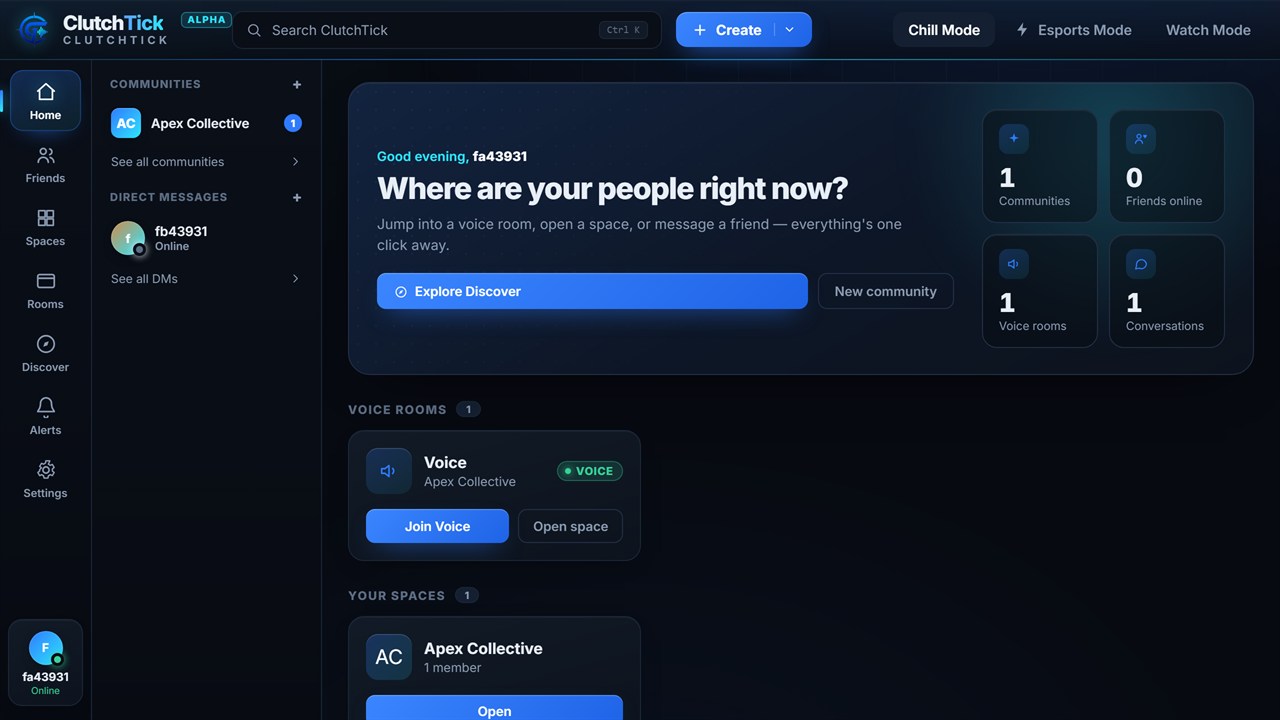
Everything you need, in one place
Choose your mode
One room, four ways to be together. Tap a mode to see it in action.
Hang out, no agenda
Drop into a laid-back room, talk freely, and just vibe — voice, video and chat with zero pressure.
- Crystal-clear voice & video
- Drop in and out any time
- Share music, memes and moments
Watch together, in sync
Go Live and share your screen — movies, streams, anything — while everyone reacts and talks in real time.
- Low-latency screen share
- Live reactions & chat
- Host holds the remote
Deep work, together
A shared Pomodoro timer, ambient sound and a calm, minimal room keep everyone in flow — and track the time you put in.
- Shared Pomodoro timer
- Built-in ambient sounds
- Daily focus stats
Comms built to win
A voice path tuned for speed, a live performance HUD and team roles — flip your room into match mode when the queue pops.
- Low-latency team voice
- Live FPS / ping / CPU HUD
- Team roles & game status
How it works
From zero to talking together in under a minute.
Community Rewards
Active communities unlock amazing perks as they grow.
Built for real connection
Everything you need to be together: instant, in sync, and on your terms.
Drop into a room and you're instantly together, with crystal-clear voice, video and screen share, all in real time.
Watch movies, streams and anime together with perfect sync, live reactions and host controls for everyone in the room.
Build your space your way, with communities, roles, events and rewards that grow right alongside your people.
Everything you'd expect — plus the parts that are missing
ClutchTick covers the essentials, then adds room-first creation, watch parties, Focus Mode and community rewards on top.
| Feature | ClutchTick | Discord |
|---|---|---|
| Start with a room — no server to set up first | ||
| Watch parties built in — screen share & live reactions | Add-on | |
| Focus Mode — Pomodoro, ambient sound & focus stats | ||
| Esports Mode — low-latency voice & live performance HUD | ||
| Community rewards — grow to earn free game servers | ||
| Free voice, video & screen share |
Discord still leads on a native mobile app and a huge bot ecosystem — we keep the comparison honest.
Free while we grow.
Everything in ClutchTick is free right now. No credit card, no catch. The paid plans below add more power and unlock as we grow.
- Create unlimited rooms
- Voice, video & screen share
- Communities & rewards
- Friends & direct messages
- Up to 50 users per room
- HD voice & video
- Custom room themes
- Priority support
- Up to 250 users per room
- Watch Mode enhancements
- Analytics & insights
- Custom branding
- Up to 1,000 users per room
- Advanced admin tools
- Community rewards boost
- Dedicated support
Everything's free while ClutchTick is in Alpha, and paid plans unlock as we grow. Running a big community, school or esports org? Talk to us →
Frequently asked questions
Is ClutchTick free to use?
Yes, and right now everything is free. The Free plan gives you unlimited rooms, voice, video and screen share, and communities, with no credit card. Paid plans with higher limits are coming as we grow.
Do I need an account?
Yes. A free account takes seconds to create and keeps your rooms, friends and settings synced across web and desktop.
What platforms is ClutchTick on?
ClutchTick runs in any modern browser today and installs as an app. The Windows desktop app, with Esports Mode, is available to download now; macOS, Linux and native mobile apps are on the way.
How is ClutchTick different?
It's room-first, not a server-and-channel maze. You create a room for whatever you're doing and everyone's in, with no clutter.
How does Watch Mode work?
Watch Mode keeps video perfectly in sync for everyone in the room, with low-latency screen share, reactions and host controls.
Is my data safe?
Your data stays yours. Communication is encrypted in transit and we never sell your information. Privacy is the default.
What about paid plans?
Everything is free right now, so there's nothing to pay for yet. Plus, Creator Pro and Team plans are on the roadmap. When they launch you'll be able to upgrade or downgrade anytime, with no long-term contracts.
Do you offer community discounts?
We do. Large communities, schools and esports orgs can reach out for custom pricing and dedicated support.
One account, every screen
No install needed to start, no platform lock-in. Sign in once and pick up right where you left off — in your browser, on your desktop, or on your phone.
In your browser
Runs instantly in Chrome, Firefox, Edge and Safari — nothing to download, nothing to keep updated.
Windows desktop
A signed native app with Esports Mode, a live performance HUD and silent auto-updates built in.
On your phone
Install it as an app straight from any mobile browser (PWA). Native iOS & Android apps are on the way.
Ready to build your space?
Jump into ClutchTick and create your first room in seconds, free, right in your browser.